Free vs Paid Show Jumping Course Design Software (2026)
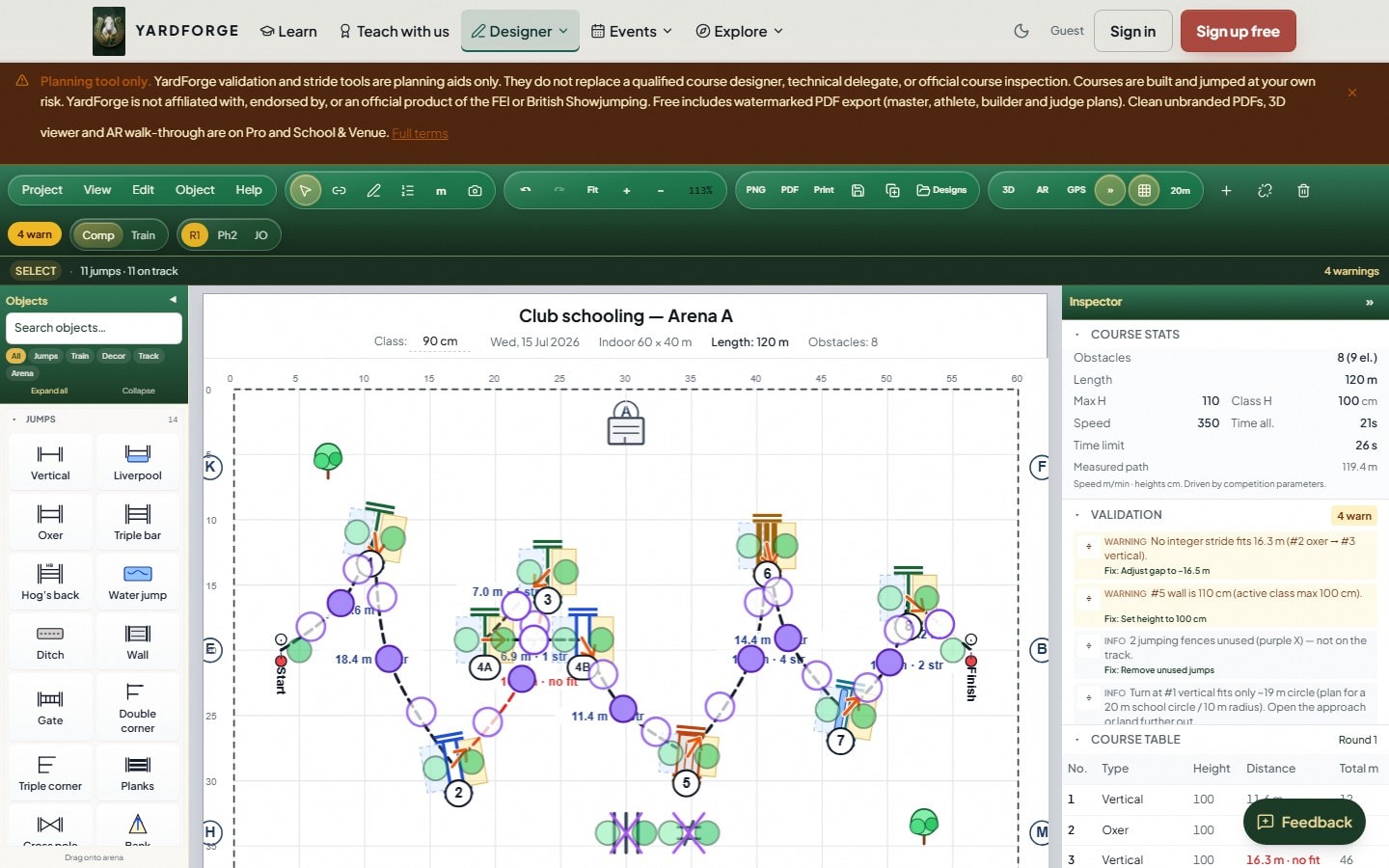
UK instructors, club designers and yard coaches usually need a free show jumping course designer that does the job: full 2D placement, live related distances, British Showjumping or FEI checks, and a plan they can print. YardForge is free during beta and nothing is on sale yet. 3D in the Designer is in early access for selected beta accounts.
Start now: open the free designer. Designing for UK club nights? See British Showjumping course design software.
This is a category buyer checklist (no competitor brand lists). Wider UK software picture: best show jumping course design software UK. Product overview: course design software.
What free must include to be useful
If free software fails any of these, you rebuild poles on the day:
- Scaled arena, metres on a plan, not a sketch photo.
- Stride / related-distance calculator on the ridden track (including combinations and bending lines).
- Rule validation for the standard you jump, typically British Showjumping and/or FEI, not only generic heights.
- Export, at least a usable PDF pack (even if watermarked): master, athlete, builder and judge roles when possible.
YardForge clears that bar: a full 2D designer, strides, FEI/BS/Hunter/Unaffiliated validation, multi-role PDF plans and unlimited saved courses. Free and beta PDFs carry a small "Designed free with YardForge" watermark. 3D in the Designer is in early access for selected beta accounts. Free during beta. Nothing is on sale yet. Planning aid only, not official FEI or British Showjumping software.
Free is enough when…
- You design for Pony Club, riding club or home schooling nights
- Watermarked PDFs are fine for internal builders and pupils
- You need unlimited saved courses without a storage wall
- You walk the course on foot rather than demo it in 3D for clients
Related: course design for Pony Club and riding clubs · how to design a show jumping course · UK course design guide.
Paid (or higher tier) is worth it when…
| Need | Why free often stops here |
|---|---|
| Clean / unbranded PDFs | Officials and external contractors want logo-free master and judge packs |
| 3D walk-through | Clients and riders preview lines in 3D before the day. On YardForge, 3D in the Designer is in early access for selected beta accounts. |
| High course volume | Free already stores unlimited layouts, pay for clean export / 3D, not storage |
| Teams / multi-user | Several designers share inventory and venues |
On YardForge, unlimited saved courses and multi-role PDF plans are available now. Free and beta PDFs carry a small "Designed free with YardForge" watermark. 3D in the Designer is in early access for selected beta accounts. Free during beta. Nothing is on sale yet.
Free vs paid checklist
| Check | Free path | Paid path |
|---|---|---|
| BS + FEI live validation | Required on free if you claim “rules” | Same tables, do not pay only for warnings |
| Multi-role PDF | Watermarked OK for clubs | Clean exports for show secretaries |
| Mobile / browser | Prefer PWA at the collecting ring | Same, plus a 3D preview. On YardForge, 3D in the Designer is in early access for selected beta accounts. |
| Offline | Shell + local save at least | Full offline multi-device sync (rare) |
| Yard ops | Useful if designer + yard share a login | School seats if staff share accounts |
Free plan vs time-limited access
Not all “free” course design software is the same:
| Model | What you get | Risk |
|---|---|---|
| Free plan (useful free tier) | Real designer + rules + export while free | Course caps or watermarked PDFs after promo periods |
| Time-limited access only | Full product for days or weeks, then paywall | You rebuild workflows when the access period ends |
| Teaser free | Draw fences but no real strides/rules/PDF | Still designing on the sand |
When you evaluate tools, ask: can I finish a club track and print a builder plan on the free tier? For UK clubs, prefer products that keep British Showjumping checks on free, not only FEI on a paid tier. YardForge is a real free designer. 3D in the Designer is in early access for selected beta accounts. Free during beta. Nothing is on sale yet.
Browser free tools vs desktop paid installs
Browser / free-first tools win when volunteers design on a phone between classes. Desktop paid tools still win for deep offline editing and legacy file import. Choose what your team opens weekly, then check BS tables and PDF roles. More on this split: best UK software guide.
How to decide in fifteen minutes
- Open a free designer and rebuild last week’s double.
- Switch standard to British Showjumping or FEI and see what validation catches (FEI vs BS guide · BS course design lander).
- Export a PDF pack, is a watermark acceptable for your next show?
- Only then weigh 3D or clean PDFs, if those are real weekly needs. On YardForge, 3D in the Designer is in early access for selected beta accounts.
- Use the stride calculator for a single related distance without building a full course.
Open the free designer
If free covers your next club night:
Open the free show jumping course designer →
Free during beta, nothing on sale. Set the standard to British Showjumping when you design UK club tracks.
Next steps
- British Showjumping course design software, UK club BS checks
- Product overview: show jumping course design software
- Course plans: show jumping course plan PDF
- Step-by-step: UK course design guide
- Distances: show jumping distances explained · stride calculator how-to
Use free when free is enough for a club track and a builder plan. Pay when a paid feature removes a weekly cost, rebuild time, unclear plans, or client walk-throughs, not because a countdown clock ran out. YardForge is free during beta. Nothing is on sale yet.

