Best Show Jumping Course Design Software UK (2026): Browser, BS Checks & PDFs
·
In short: Good course design software puts fences on a scaled arena, shows strides as you move them and checks British Showjumping or FEI rules live. YardForge runs in a browser or on a phone with no install, and is free during beta, with nothing on sale. It is a planning aid, not official British Showjumping software.
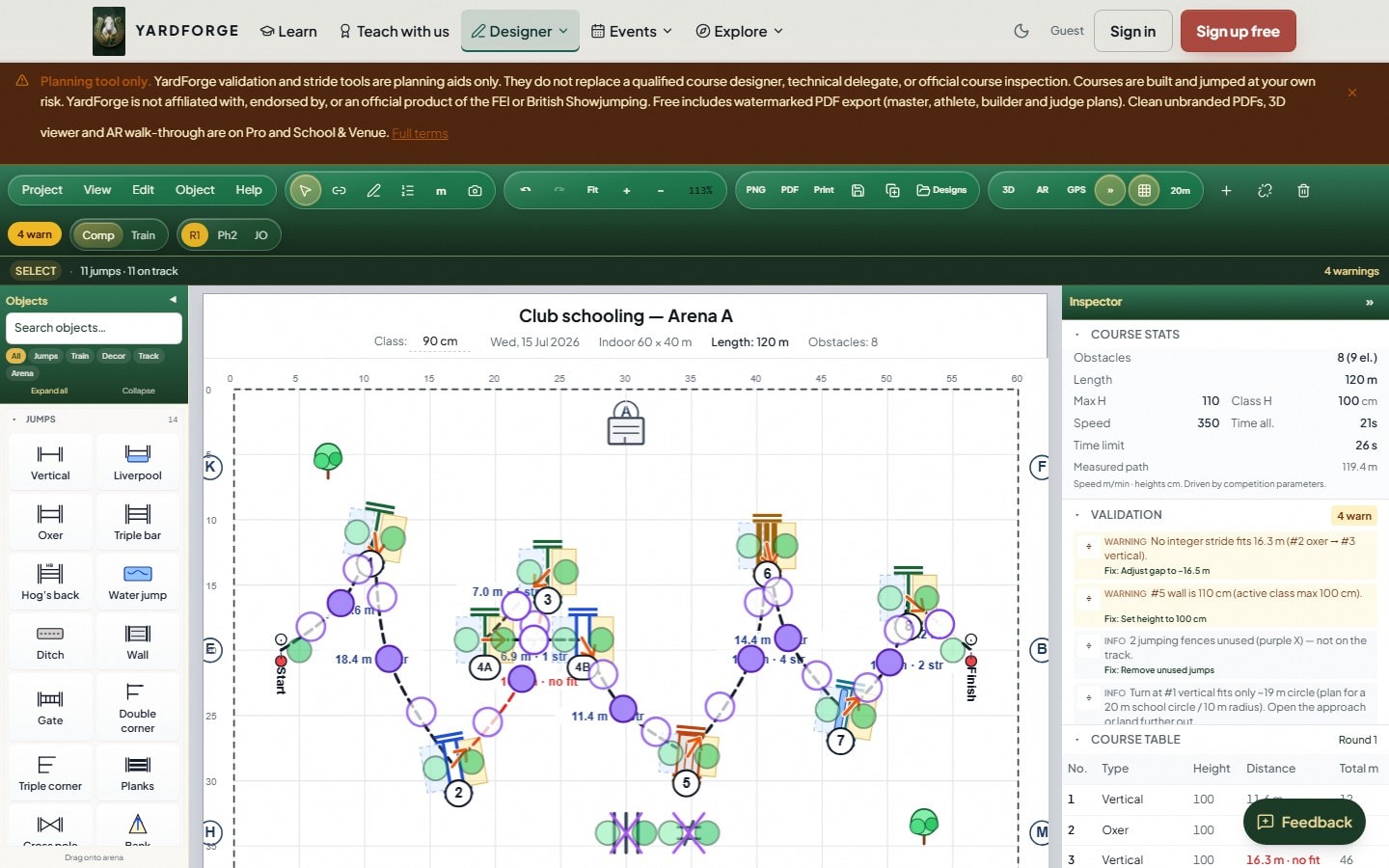
If you build tracks for Pony Club nights, riding-club clear rounds or affiliated classes, show jumping course design software has to earn its keep. Before it sits on your laptop or phone, check it can do these four jobs.
The four jobs that matter
| Job | What good software does |
|---|---|
| Scaled arena | You place fences on a real arena size (40×20, 60×20, grass ring), not a freehand sketch that drifts off scale. |
| Strides and relateds | Related distances update as you move fences; combinations and bending lines show pole-to-pole numbers along the ridden track. |
| Rule checks | Live British Showjumping or FEI validation on heights, spreads and combination distances, not a manual look-up after poles are built. |
| Printable plans | Export plans the builder, judge, athlete and secretary can actually use on show day. |
Miss one and the tool is fine for doodling, then awkward when the ring party asks for numbers.
Browser, Windows, or subscription?
| Shape | Example on the SERP | Fits when… | Trade-off |
|---|---|---|---|
| Free browser designer | YardForge | Club nights, schooling, Pony Club / unaffiliated; you want BS/FEI checks and plans without installing anything | Watermarked PDFs on Free; needs a sensible offline story for weak 4G |
| Windows one-time | Acuro (~USD 297 public price, offline install) | You want a dedicated PC programme, full offline editing, one purchase rather than a subscription | Laptop-bound; not UK-BS-first framing |
| Web subscription | Parkour.design (browser app, subscription tiers, FEI validation, 3D) | You want cloud designs, heavier 3D / materials workflows, and are happy to pay annually | Recurring cost; less club-BS packaging than a UK-first tool |
Try a track in the free browser designer before you buy an install or a subscription. YardForge is a planning aid. It is not official British Showjumping software.
What show jumping course design software must do
People land here for two reasons: help with show jumping course design, or shopping for course design software. The checklist is the same either way.
A usable tool lets you:
- Draw or select an arena to scale, so measured distances match what you will tape on the surface.
- Connect a track and read strides on related distances as fences move, especially doubles, trebles and bending lines.
- Switch the standard to British Showjumping or FEI and see live flags (and, where the product supports it, suggested fixes) before you build.
- Export multi-role PDFs (master, athlete, builder, judge) so the crew is not working from a phone photo of a whiteboard.
If it only draws nice fences without scale, strides, rule checks or printouts, keep looking.
For the practical building side of UK club nights, see BS show jumping course building rules.
UK club checklist (British Showjumping and FEI)
Before you trust a tool for an affiliated show or a busy club calendar, verify:
- British Showjumping rule sets sit beside FEI. Many international products lean FEI-only; UK club builders need BS combination tables and heights as well.
- Arena sizes match what you actually jump on: indoor schools, all-weather arenas, and grass rings with odd dimensions.
- Mobile or browser use at the collecting ring. A course design app you can open on a phone beats software that only runs on a laptop in the lorry.
- Honest labelling. Treat every digital designer as a planning aid. Confirm finals against the current BS or FEI rule book and your TD or course designer of record. No consumer tool is official British Showjumping software.
If a vendor cannot show live BS or FEI validation on a combination, that is usually the deal-breaker. It is the check that saves rails and arguments on the day.
Browser, Windows install, or subscription?
The open web search for course design software usually surfaces three shapes. Pick by how your team works on a Tuesday evening, not by the longest brochure list.
When free browser is enough
Stay on a free browser designer when you mainly:
- School at home or run Pony Club / unaffiliated nights
- Need BS or FEI checks before poles go up
- Can live with watermarked multi-role PDFs for the club crew
- Want to design on a phone or tablet without an install
YardForge Free includes the full 2D designer, stride calculator, BS/FEI validation and unlimited saved courses with watermarked master, athlete, builder and judge plans. Free and beta PDFs carry a small "Designed free with YardForge" watermark. Shared links open the read-only 2D course plan. 3D in the Designer is in early access for selected beta accounts. See pricing.
When you need paid or installed
Expect to pay, or choose a dedicated Windows install, when you regularly need:
- Clean, unbranded PDFs going to judges and external builders every week
- Heavy offline editing on a Windows laptop at venues with weak signal
- 3D / materials workflows beyond what your free or beta tier already unlocks
- Legacy file import (for example Visio / PPD-style workflows on some paid web tools)
Acuro is a Windows one-time purchase (about USD 297 on its public site) with offline design and optional 3D sketches. Parkour.design is a browser subscription with FEI validation, 3D visualisation and tiered PDF / materials features. Both fit those workflows; neither replaces the UK club checklist above.
Free vs paid decision table
| Question | Free is enough if… | Paid (or higher tier) if… |
|---|---|---|
| Validation | Live BS/FEI on combinations | Same: do not pay only for "red flags" |
| Watermarked plans are fine for club nights | Clean plans go out to officials weekly | |
| 3D / walk-through | You walk the course on foot | You preview lines for clients or big shows |
| Limits | A handful of layouts you revisit | Dozens of courses, multi-user inventory |
| Access | Browser / phone at the collecting ring | Dedicated offline Windows install |
For a deeper free-vs-paid walkthrough, read free vs paid show jumping course design software. Product-level detail also sits on the show jumping course design software lander.
How YardForge fits the checklist
Map the four jobs to what is in the product today:
| Checklist job | YardForge |
|---|---|
| Scaled arena | 2D canvas with common UK arena sizes; place fences to plan scale |
| Strides / relateds | Live stride readout along the ridden track; combinations and bending lines update as you drag |
| Rule checks | British Showjumping, FEI, Hunter and Unaffiliated standards with live validation |
| Printable plans | Master, athlete, builder and judge PDFs. Free and beta PDFs carry a small "Designed free with YardForge" watermark. |
Also useful for UK club builders:
- Browser / PWA access so you are not tied to one desktop install
- Sequence-first design (place, connect, draw-through) rather than a pure connection-graph editor
- Path into yard tools if you also run horses and staff on the same login
What it is not: YardForge is not official British Showjumping software. Use it to plan and check; confirm with the current rule book and your officials. It does not yet offer full legacy PPD / Visio import or complete offline multi-device sync. If those are must-haves tomorrow, compare a Windows specialist or a subscription tool that advertises them.
Free and beta PDFs carry a small "Designed free with YardForge" watermark. Shared links open the read-only 2D course plan. 3D in the Designer is in early access for selected beta accounts. Start with a course you already know: open the designer, set the standard to BS or FEI, place a double, and see what validation and strides report before you move a single pole.
Related guides
- Course design app - mobile / browser design without an app-store download
- Show jumping course design software - product overview for UK builders
- Free vs paid show jumping course design software - when watermarked plans are enough
- BS show jumping course building rules - practical club building checklist
- Showjumping events software - entries, results and course plans for club shows
- Pricing - Free during beta. Nothing is on sale yet.
Next steps
- Open the free designer and rebuild a course you jumped last season.
- Switch the standard to British Showjumping or FEI and note what validation catches on combinations.
- Export a builder or judge plan and check whether a watermark is acceptable for your next club night, or whether you need clean PDFs weekly.
Pick the tool your ring party will actually open on a wet Tuesday. Scaled arenas, live strides, BS/FEI checks and printable plans move poles; a long feature list does not.

